*Memory Matrix
Writings, notes, and data
Pages
Categories
- America Notes (1)
- Book notes (5)
- Computing Notes (58)
- Errata Notes (2)
- Gaming Note (3)
- Garden Notes (1)
- History notes (4)
- Literature Notes (2)
- Social Science notes (11)
- Spiritual notes (7)
Blogroll
- <toby> Mackenzie's site
- A Common IT Man's Blog
- a3nm's blog
- Alexander Zeitler
- American Thinker
- Anant Shrivastava
- Barter Is Evil
- Card Catalog
- Chris Meller
- Chronicles Magazine
- Consumer Rights Wiki
- Curmudgucation
- Debunking Skeptics
- Elijan Mastnak
- Fireborn
- Global Geopolitics
- Gwern Branwen
- Issues & Insights
- Joe Wingbermuehle
- Julia Evans
- Kailash Nadh
- Laidback Gardener
- Las Ultimas Noticias
- Laura Aboli channel
- Lew Rockwell
- Matt Mahoney's Home Page
- Menno Simons.net
- Michael Eriksson
- Natural News
- Neocities
- Norman Geisler
- Pavel Rojtberg
- Piekniewski's blog
- Prophecy Update
- Psuedo Singleton / Justin
- Ray Peat
- Reminiscence of the Future
- Richard Brath
- Schneier on Security
- Simon Says
- Straight Line Logic
- The Cyanide Hole
- The Divinely Inspired Scriptures
- The Last Refuge
- The Occidental Observer
- The Prophecy of Jacob and Esau
- The Skeptical Doctor
- The Somnolescent Archives
- The Text of the Gospels
- The Toll
- Turbulent Times
- Unveiling the Apocalypse: Prophecy in Catholic Tradition
- What is Truth?
Books
- A Defence of the True Church Called Quaker (John Cook, 1659)
- Brenton Septuagint Translation
- English Revised Version (1885)
- Geneva 1590 (without Apocrypha)
- Holy Bible – Geneva 1579
- King James' Version
- Patriarchal Text (1904)
- The Holy Bible translated by Robert Young (1863)
- Westminster Leningrad Codex (HTML)
- Westminster Leningrad Codex (PDF)
Data
Gaming
News
Tools
- Ahuka Communications
- AWMACH Bible Library
- Baidu (Boolean Search capability!)
- Bible Research
- Biblical Studies Commons
- Bob is the Oil Guy Forums
- D3 Examples
- D3.js
- D3.js Graph Gallery
- Debian Handbook
- DeskDr.com
- DEV Community
- Dissertations from Andrews U.
- Dot Net Perls
- Fallacies
- Filmot
- Greek Word Study Tool
- Hugging Face
- Introduction to Logic
- Level 1 Techs Forums
- Linux Reviews
- Logical Fallacies
- Marginalia (old address)
- Marginalia Search
- Mechanical Translation Project
- medRxiv
- Mojeek
- NetworksDB IP Intelligence
- Online Etymology Dictionary
- Open Culture
- OpenScriptures Hebrew Bible
- Post.Bytes
- Start Page
- Tanach.us (Revision of WLC)
- Windows Tip of the Day
- Word Reference
- Zeitgeist Reviews
- Zettelkasten Forum
- Zettelkasten Method
Web 1.0
Tags
- 7Zip
- AI
- Aider
- AlmaLinux
- Alphabet
- Amos
- Anthropic
- apologetics
- AppImage
- Apple
- apt
- arbitration
- archiving
- Backup
- Baptist
- Bash
- Batch
- Bible
- Books
- bookworm
- bullseye
- California
- castle
- Caution
- CentOS
- Changelog
- children
- Chromium
- Claude
- color
- Colorado
- commentary
- copyright
- counties
- Cron
- database
- Debian
- Department of Energy
- Devuan
- digital ID
- digital sovereignty
- discrimination
- economics
- egregore
- ERV
- Extensions
- Fedora
- filter bubble
- Firefox
- floccus
- Ford
- freedom
- futurism
- garden
- Genesis
- genetics
- Geneva
- gentiles
- Georgia
- Ghostscript
- GM
- GPL
- Greek
- Grub
- GTK
- Health
- Hebrew
- history
- HP
- HPLIP
- Hydrogen
- hypocrisy
- hypothesis
- Hyundai
- IceWM
- iftop
- Illinois
- iptraf
- Java
- Jeremiah
- Jeremias
- Joplin
- Kafka
- Kentucky
- king
- KJV
- Labor
- language
- Leningrad
- Library
- LibreWolf
- Linux
- Logseq
- Luke
- LXQT
- majority text
- MariaDB
- marketing
- Massachusetts
- Matthew
- Michigan
- Microsoft
- Minecraft
- Mistral
- Mojeek
- Montana
- Mozilla
- MySQL
- Nano
- networking
- New Jersey
- Nextcloud
- Nikola
- North Carolina
- North Dakota
- ntp
- Obsidian
- Ollama
- open source
- Oracle Linux
- Organization
- paired comparision
- Partitions
- php
- Picom
- preterism
- Price's law
- privacy
- programming
- prophecy
- Python
- QOwnNote
- QPDF
- R
- RAID
- rstudio
- r^2
- SELinux
- serfdom
- sharecropping
- SSH
- Stata
- Stephanus
- swap
- systemd
- Tennessee
- textus receptus
- Thunderbird
- time series analysis
- Tischendorf
- treasuries
- tree
- Trilium
- uMatrix
- Vermont
- VirtualBox
- Virtualization
- Vivaldi
- Volvo
- Westcott & Hort
- Windows
- wisdom
- WordPress
- WSL
- X11
- XFCE
- yacy
- z240302wa
- z260205wa
- z260518wa
- z260518wb
- z260519wa
- z260521wa
- z260525wa
- Zen Burn
- Zettelkästen
- Zettlr
- Zotero
- ἔθνεσιν
- ἔθνος
- θεός
- ΙΕΡΕΜΙΑΣ
Thunderbird Row Highlighting
Revisions: 21 January 2024, first publication
The Thunderbird developers are moving to a new user interface code base for Thunderbird 115 and Thunderbird 102 is the last version that will work with the historical userChrome.css customizations. The userbase for Mozilla products has continually shrunk over the past few years and the chances of equivalent customization abilities being discovered and written about strike me as pretty low. Because of the change, I have mirrored Thunderbird 102.14 for Windows and Linux in 64-bit and 32-bit versions in the event that the old versions disappear from the Mozilla site. The Source is available on the Mozilla mirror as of August 11, 2023. The releases are located here.
The userChrome.css below allows the following persistent tag colors. It also contains text customization for the interface. And it contains alternate row highlighting, where one row is light grey and the other white. The alternate row highlighting conflicts with the background colors for tags. One must choose which feature to have. The userChrome.css goes in the profile directory in a subfolder called chrome.
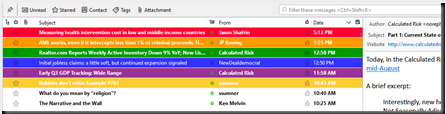
The code for highlighting the tag backgrounds was found on a French website located here. E.g. C:\Users\username\AppData\Roaming\Thunderbird\Profiles\1a2b3cde.default-release\chrome
@namespace url("http://www.mozilla.org/keymaster/gatekeeper/there.is.only.xul");
/* set default namespace to XUL */
/* thanks to Jean-Claude, */
/* https://forums.mozfr.org/viewtopic.php?t=143173 */
/*Important tag IMPORTANT*/
treechildren::-moz-tree-row(T_24label1)
{
      border-bottom: 1px solid #FFFFFF !important;
      background-color:  #FF0033   !important;
}
treechildren::-moz-tree-cell-text(T_24label1)
{
      color: #FFFFFF !important;
}
treechildren::-moz-tree-row(T_24label1, selected)
{
      background-color: #b71c1c !important;
}
treechildren::-moz-tree-cell-text(T_24label1, selected)
{
  color: #00FF00  !important;
}

/*Travail tag   WORK*/
treechildren::-moz-tree-row(T_24label2)
{
  border-bottom: 1px solid #FFFFFF !important;
  background-color:  #FF9900   !important;
}
treechildren::-moz-tree-cell-text(T_24label2)
{
  color: #FFFFFF !important;
}
treechildren::-moz-tree-row(T_24label2, selected)
{
  background-color: #FF9900 !important;
}
treechildren::-moz-tree-cell-text(T_24label2, selected)
{
  color: #00FF00  !important;
}

/*Personnel tag PERSONAL*/
treechildren::-moz-tree-row(T_24label3)
{
  border-bottom: 1px solid #FFFFFF !important;
  background-color:  #009900   !important;
}
treechildren::-moz-tree-cell-text(T_24label3)
{
  color: #FFFFFF !important;
}
treechildren::-moz-tree-row(T_24label3, selected)
{
  background-color: #009900 !important;
}
treechildren::-moz-tree-cell-text(T_24label3, selected)
{
  color: #00FF00  !important;
}

/*A faire tag*/
treechildren::-moz-tree-row(T_24label4)
{
  border-bottom: 1px solid #FFFFFF !important;
  background-color:  #3333FF   !important;
}
treechildren::-moz-tree-cell-text(T_24label4)
{
  color: #FFFFFF !important;
}
treechildren::-moz-tree-row(T_24label4, selected)
{
  background-color: #3333FF !important;
}
treechildren::-moz-tree-cell-text(T_24label4, selected)
{
  color: #00FF00  !important;
}

/*Peut attendre tag*/
treechildren::-moz-tree-row(T_24label5)
{
  border-bottom: 1px solid #FFFFFF !important;
  background-color:  #993399  !important;
}
treechildren::-moz-tree-cell-text(T_24label5)
{
  color: #FFFFFF !important;
}
treechildren::-moz-tree-row(T_24label5, selected)
{
  background-color: #993399 !important;
}
treechildren::-moz-tree-cell-text(T_24label5, selected)
{
  color: #00FF00  !important;
}

/*test tag*/
treechildren::-moz-tree-row(Ttest)
{
  border-bottom: 1px solid #FFFFFF !important;
  background-color:  #FFCC33  !important;
}
treechildren::-moz-tree-cell-text(Ttest)
{
  color: #FFFFFF !important;
}
treechildren::-moz-tree-row(Ttest, selected)
{
  background-color: #FFCC33 !important;
}
treechildren::-moz-tree-cell-text(Ttest, selected)
{
  color: #00FF00  !important;
}

/* 9 August 2023 Additions */
/* Set Font Size In Folder Pane */

#folderTree >treechildren::-moz-tree-cell-text {
  /*font-family: Lucida Sans !important;*/
  font-size: 9pt !important; }

/* Set Font Size In Thread Pane */

#threadTree >treechildren::-moz-tree-cell-text {
  /*font-family: Lucida Sans !important;*/
  font-size: 9pt !important; }

#threadTree treechildren::-moz-tree-row    {
/*  border-bottom: 1px dotted grey !important;  */
  height: 24px !important; }

/* folder list spacing */

#folderTree treechildren::-moz-tree-row    {
  height: 24px !important; }

/* The silver background color on alternating rows */
#threadTree treechildren::-moz-tree-row(odd) {
  -moz-appearance: none !important;
  background-image: none !important;
  /* the !important property overrides previous styling rules */
  /* this line enables alternate color row highlighting, but
  tag backgrounds on this row cannot be highlighted.  Only one
  background highlighting can be applied Disabled 9 August 2023
  to enable tag background highlights*/
  /* background-color:#F3F6FA !important; */

}

#threadTree treechildren::-moz-tree-row(selected) {
  background-color: -moz-Dialog !important;
}
#threadTree treechildren::-moz-tree-row(selected, focus) {
  background-color: Highlight !important;
}

#folderTree treechildren::-moz-tree-row(selected) {
  -moz-appearance: none !important;
  background-image: none !important;
  background-color: Highlight !important;
}
#folderTree treechildren::-moz-tree-row(selected, focus) {
  -moz-appearance: none !important;
  background-image: none !important;
  background-color: Highlight !important;
}
Functions in Bash
This is the code for a function in Bash script.
 #!/bin/bash
 # Define a function
 greet() {
 echo "Hello, $1"
 }
 # Call the function with "World" as the argument
 greet "World"
Looping through filenames in Bash
To loop through the subdirectories in a folder, when those subdirectories may contain spaces in the file names, use the following procedure.
OLD_IFS=$IFS && IFS=$'\n'
 for directory in $HOME/somefolder/*/; do
 echo “some code here”
 done
 IFS=$OLD_IFS
Bash and *nix Note no. 2
This document contains some notes on .bashrc for use with Linux systems.
alias ll=’ls -alF’
alias la=’ls -A’
alias l=’ls –CF’
if [ -f ~/.bash_aliases ]; then
. ~/.bash_aliases
fi
The preceding two blocks come standard on Ubuntu as of version 2022.04. One tweak for WSL2 on Windows might be the addition of this line.
sudo bash “/etc/rc.local”
and in the rc.local follow, add the following.
#!/bin/bash
rm -f /etc/resolv.conf
echo “nameserver 1.1.1.1″ >> /etc/resolv.conf
echo “nameserver 8.8.8.8″ >> /etc/resolv.conf
This is because WSL2 may place non-routable IP addresses using 172… in resolv.conf. As of this writing, following steps recommended to disable the generation of the file fails to resolve the issue where the file is newly generated with every new terminal launched in Windows terminal. Having this run with each new Bash login ensures success with network communications. The location /etc/rc.local may seem like an odd location for this.
The crontab to ensure to check each minute to ensure a virtual machine is running in VirtualBox is as follows.
*/1 * * * * VBoxManage startvm “VMNAME” –type headless
*/1 * * * * VBoxManage startvm “VMNAME2″ –type headless
If the virtual machine is already running, then it will not start a new copy of it. This is better than attempting to run the script via a system wide script after a reboot. Running it this way allows a simple crontab for the user for whom the machine needs to run under. To run a script every five minutes, add the crontab as follows:
*/5 * * * * /home/USERNAME/nextcloudcron
In this example, the nextcloudcron script will run every five minutes. This particular script is one for use contacting my Nextcloud instance for webcron. It does not contain a .sh on the filename, because some implementations may disallow crontab scripts with file extensions.
The following checks inside a subdirectory and pulls in the files therein as bash sources. This is useful for breaking aliases, variables, and other items into different files.
if [ -d ~/.bashrc.d ]; then
for rc in ~/.bashrc.d/*; do
if [ -f "$rc" ]; then
. “$rc”
fi
done
fi
The following uses nano as the crontab editor.
export VISUAL=nano
On Oracle Linux 9 on AWS, it is necessary to install Cronie to enable cron jobs. To ensure this starts after reboots, add the following to /etc/rc.local.
bash /sbin/crond
To create a date line for a log file, use the following:
echo $(date) >> /home/USER/FILENAME
The Shebang for the top of bash files is
#!/usr/bin/env bash
To auto-update via DNF and leave a log of what was accomplished, use the following script. The script will write a list of the updates to the systemupdates.log file, and then update the system with details of that process written to the dnfupdates.log file.
#!/usr/bin/env bash
echo $(date) >> /home/USER/systemupdates.log
sudo dnf check-update >> /home/USER/systemupdates.log
echo $(date) >> /home/USER/dnfupdates.log
sudo dnf update -y >> /home/USER/dnfupdates.log 2>&1
Bash and *nix Note no. 1
7 July 2023:
Ubuntu 22.04′s update notifier seems to not include the option to configure any settings, at least after certain conditions exist on a particular system. To stop the notifier from appearing. To stop the notifier from appearing use
sudo apt-get remove update-notifier
7 July 2023:
There are non-snap builds of ungoogled-chromium for Ubuntu
6 July 2023 and prior:
To disable automatic updates on Ubuntu:
sudo dpkg-reconfigure unattended-upgrades
sudo apt remove packagekit
In .bashrc create the following alias:
alias nano="nano -c --guidestripe 80"
This will open always Nano with line and column numbering along with a long line marker at the specified column. The long line marker feature works for Nano version higher than 4, which doesn’t include the version in the CentOS 7 repositories.
In .bashrc add the following line:
export DISPLAY=\
"`grep nameserver /etc/resolv.conf | sed 's/nameserver //'`:0"
This adds the IP address of the instance to the display variable for use with Windows Subsystem for Linux and VcXsrv.
In .nanorc add the following items. The first two lines are commented because the command line switch used in the alias for the line numbers creates no artifacts when using copy-paste.
#set linenumbers
#set constantshow

# https://www.nano-editor.org/dist/latest/nanorc.5.html
set guidestripe 80

include /usr/share/nano/autoconf.nanorc
include /usr/share/nano/patch.nanorc
include /usr/share/nano/nanorc.nanorc
include /usr/share/nano/groff.nanorc
include /usr/share/nano/awk.nanorc
include /usr/share/nano/man.nanorc
include /usr/share/nano/java.nanorc
include /usr/share/nano/sh.nanorc
include /usr/share/nano/po.nanorc
include /usr/share/nano/texinfo.nanorc
include /usr/share/nano/python.nanorc
include /usr/share/nano/perl.nanorc
include /usr/share/nano/pov.nanorc
include /usr/share/nano/ocaml.nanorc
include /usr/share/nano/tcl.nanorc
include /usr/share/nano/debian.nanorc
include /usr/share/nano/lua.nanorc
include /usr/share/nano/xml.nanorc
include /usr/share/nano/gentoo.nanorc
include /usr/share/nano/objc.nanorc
include /usr/share/nano/tex.nanorc
include /usr/share/nano/guile.nanorc
include /usr/share/nano/php.nanorc
include /usr/share/nano/c.nanorc
include /usr/share/nano/nftables.nanorc
include /usr/share/nano/spec.nanorc
include /usr/share/nano/elisp.nanorc
include /usr/share/nano/ruby.nanorc
include /usr/share/nano/go.nanorc
include /usr/share/nano/nanohelp.nanorc
include /usr/share/nano/default.nanorc
include /usr/share/nano/json.nanorc
include /usr/share/nano/css.nanorc
include /usr/share/nano/mgp.nanorc
include /usr/share/nano/asm.nanorc
include /usr/share/nano/mutt.nanorc
include /usr/share/nano/javascript.nanorc
include /usr/share/nano/postgresql.nanorc
include /usr/share/nano/rust.nanorc
include /usr/share/nano/fortran.nanorc
include /usr/share/nano/cmake.nanorc
include /usr/share/nano/makefile.nanorc
include /usr/share/nano/html.nanorc
include /usr/share/nano/changelog.nanorc
Using Tar and Gzip:
tar -zcvf output_file_name[.tar.gz or .tgz] directory_to_compress
tar -Jcvf output_file_name[.tar.xz] directory_to_compress
reads compression level for XZ from environmental variable, but note that xz utils is not installed by default on ubuntu 10.04
tar -xvf works to extract .tar.gz file created like in the above
The Tar and Gzip commands use compression settings specified in .bashrc
export GZIP=-9

export XZ_OPT=-9
Add the following to .bashrc for a console calculator:
calc() { echo "$*" | bc -l; }
For the ll alias, use the following in .bashrc
alias ll='ls -alF'
To change the terminal name use the following in .bashrc. The command differs depending upon which version of Gnome one uses.
# For older versions of gnome-terminal
#shellrename() { read -p "Enter new shell name: " name && PROMPT_COMMAND='echo -ne "\033]0;${name}\007"'; }
# Works on OpenSUSE 15.3
#PS1=$PS1"\[\e]0;test1\a\]"
shellrename() { read -p "Enter new shell name: " name && PS1=$PS1"\[\e]0;${name}\a\]"; }
To obtain a uuid, add the following to .bashrc:
uuid() { UUID=$(cat /proc/sys/kernel/random/uuid) && echo $UUID;
Zen Burn color scheme for the terminal, but sometimes causes problems with work via SSH.
# Zen Burn
# Another old way that works great in gnome-terminal while causing problems
# in some configurations involving SSH:
echo -ne '\e]12;#BFBFBF\a'
echo -ne '\e]10;#DCDCCC\a'
echo -ne '\e]11;#3F3F3F\a'
echo -ne '\e]4;0;#3F3F3F\a'
echo -ne '\e]4;1;#705050\a'
echo -ne '\e]4;2;#60B48A\a'
echo -ne '\e]4;3;#DFAF8F\a'
echo -ne '\e]4;4;#506070\a'
echo -ne '\e]4;5;#DC8CC3\a'
echo -ne '\e]4;6;#8CD0D3\a'
echo -ne '\e]4;7;#DCDCCC\a'
echo -ne '\e]4;8;#709080\a'
echo -ne '\e]4;9;#DCA3A3\a'
echo -ne '\e]4;10;#C3BF9F\a'
echo -ne '\e]4;11;#F0DFAF\a'
echo -ne '\e]4;12;#94BFF3\a'
echo -ne '\e]4;13;#EC93D3\a'
Circa 2015: Adding Windows to CentOS 7 and Grub 2 after installing CentOS and no automatic configuration of Windows boot options. The file to manually edit is /etc/grub.d/40_custom.
menuentry "Windows 10 Professional" { set root=(hd0,1) chainloader +1 }
After editing, update Grub and reboot using the following command.
grub2-mkconfig –output=/boot/grub2/grub.cfg
The following shows one of the custom file contents circa 2018 or 2019 after some changes to installers and autodetection.
#!/bin/sh
exec tail -n +3 $0
# This file provides an easy way to add custom menu entries. Simply type the menu entries you want to add after this comment.
# Be careful not to change the 'exec tail' line above.
menuentry "Windows (system) (on /dev/sda1)" --class windows --class os { insmod part_msdos insmod ntfs insmod ntldr set root='(hd0,msdos1)' ntldr ($root)/bootmgr}
Minecraft Tweaks
To launch
java -Xms2048M -Xmx2048M --add-modules=jdk.incubator.vector -XX:+UseG1GC -XX:+ParallelRefProcEnabled -XX:MaxGCPauseMillis=200 -XX:+UnlockExperimentalVMOptions -XX:+DisableExplicitGC -XX:+AlwaysPreTouch -XX:G1HeapWastePercent=5 -XX:G1MixedGCCountTarget=4 -XX:InitiatingHeapOccupancyPercent=15 -XX:G1MixedGCLiveThresholdPercent=90 -XX:G1RSetUpdatingPauseTimePercent=5 -XX:SurvivorRatio=32 -XX:+PerfDisableSharedMem -XX:MaxTenuringThreshold=1 -Dusing.aikars.flags=https://mcflags.emc.gs -Daikars.new.flags=true -XX:G1NewSizePercent=30 -XX:G1MaxNewSizePercent=40 -XX:G1HeapRegionSize=8M -XX:G1ReservePercent=20 -jar server-1.21.1.jar nogui
Which place to live, no. 1
The U.S. Department of Labor shows the states with mandatory lunch breaks and the states with mandatory rest periods. The national Conference of State Legislatures has a list of which states codified religious and personal belief vaccine exceptions.
This article is to narrow down long a long term settlement plan based upon a critical factor, probably the most important factor. Some might not think this factor is that important, but since it is encountered day in and day out every working day of every year, it is extremely important. The factor is whether or not a worker gets breaks at work. Numerous states do not mandate any kind of break. Others mandate a lunch period, and others mandate lunch and rest periods. Some mandate lunch periods only for those under 18. Ostensibly, the day after one’s 18th birthday is the point at which one no longer needs rest during a workday for those states.
I have worked in Kentucky and Tennessee. Both of these states have different regulations. Tennessee requires a lunch break, but does not specify rest periods. Kentucky specifies lunch and rest periods. In the state of Kentucky, every employer I ever worked for except for one complied with all the provisions. A single employer hated the idea of rest periods, but such behavior was illegal and that gives people the right to argue against them. In Tennessee, which has a slightly different framework, I have had had 2 employers which had both lunch and rest breaks, 1 employer that had only a 30-minute lunch break in the center of a ten hour shift, and one employer that had none until complained on severely, and then the complainers got the mandatory lunch break while the non-complainers still received no breaks.
New Hampshire was on my short list, but it mandates only lunch breaks like Tennessee. That means a distribution center with a senior walking 10 miles a day would have no rest periods and that would be legal and they would have no argument against that treatment.
With n=4, lunch and break stands at 50% for a state that regulates only a lunch period, and greater > 95% in a state that regulates both lunch and breaks. Part of that may not even relate to any kind of enforcement, but the simple cultural difference that workers should be able to rest for a few minutes during the day and the people growing up under such a culture just expect that it will happen for others.
Illinois, Kentucky, Colorado, and Vermont pass the anti-slavish test. California also regulates lunch and rest periods, but they and New York have chosen the path of gene-therapy anti-humanism and cannot be considered among the moral states that we consider further.
Of those 4 states continuing, Vermont’s regulation about rest periods is a vague standard of reasonable to protect health and hygiene. The other three specify minimum time amounts. So any person who will have to work a full time job in their senior years should live in one of those three, possibly four states. Frankly, anyone who has to work a full time job at all should live in one of those states. Maybe a further look at the pragmatic realities related to Vermont’s non-specific standard would make it a quartet of states with respect of workers.
A non passive-incomer’s state of choice to settle in would then be either Illinois, Kentucky, or Colorado, so that they may have some rest breaks during the thousands of days they spend working over the course of their lives. It’s illegal to work animals with no breaks in the same states you can do it to humans if you are a monied interest.
T+n time series analysis
This isn’t stock advice, it’s a data and math project. AAPL is interesting (not investing advice!) from a data perspective. Part of my big data project was the creation of a tool to analyze every symbol regressed on every other symbol for numerous lags. In addition to revealing the vendor’s mangling of data for unknown purposes, that analysis of lags produced at least one independent variable upon which the regression of future AAPL produced a .3 R-squared value. That is a weak or low effect size, but was a genuine discovery which passed hypothesis testing across time horizons. That was Direxion Daily S&P Oil & Gas Exp. & Prod. Bear 2X Shares (DRIP). DRIP was the first independent variable I discovered through the lag analysis. The problem is that the lag analysis is very computational intensive. Then, after doing that, ferreting out the red herrings because of bogus data takes another large amount of time. It seems that my data provider inserts bogus data producing .9 r^2 values between different vectors. These are of course problems that can one can mitigate with better code. That too, takes time. This isn’t a document about that first statistically significant predictor for AAPLt+3.
Keeping the t+ and t- in mind causes some difficulty for me. T+2 means today plus 2. If today is January 5, t+2 is January 7. If we are analyzing t+3, that is January 8. Programming in 0-indexed programming languages produced an inner impulse to count from 0 instead of 1. With zero indexing, the third option is 7 as shown in this example of a list [5, 6, 7, 8]. This is a heavily ingrained impulse that I must both use and mitigate. This project used Python and R and shell scripting.
The first 1 factor model devised using DRIP was as follows:
-2.065(DRIP Typical %change) -.0040 = AAPL Typical %changet+3
This model was tested in Stata using the data in manipulated in Python and R. This formula may be of no use in the future or even now. I might revisit this in discussing lags portion of the project later
Stata reference material
Linear regression analysis using Stata contains a look at Stata output for regression. There is also an excellent document on Regression Analysis | Stata annotated output at this link. There is an excellent document on Basic Data Analysis and Manipulation at this link. Yt−1 is the first lag of Yt (Chapter 10, p. 1).
Apple and Peach Goal Trees
I added an Apple tree to the planter that contains the peach tree. This is a Red Delicious apple tree sprouting leaves for the spring.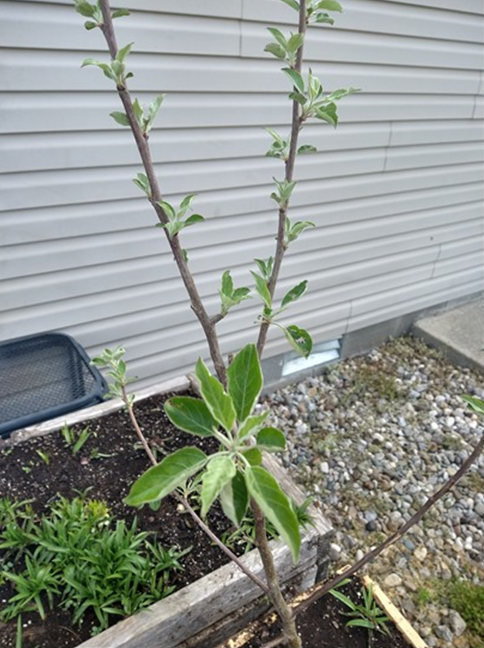
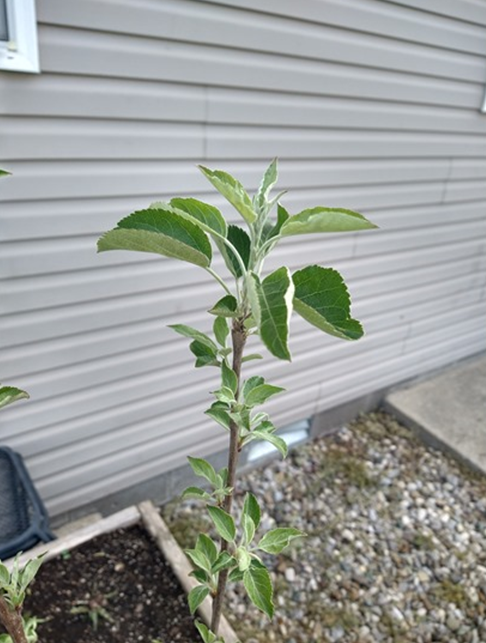
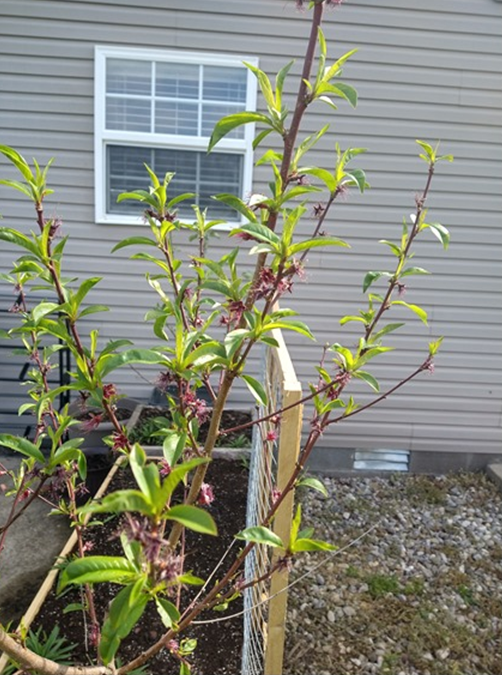
The Peach Tree looks good. Here it is before the placement of the Apple tree.
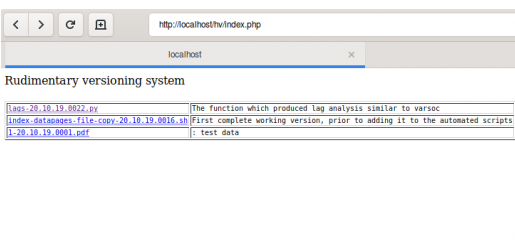
Rudimentary versioning system
Some time ago, Python 2 was the default language for use with Linux and Gnome 3. A set of extensions for Gnome, called Nautilus Python existed which allowed one to create customized right click menus. One of these was called “Historical Copy” and it created a lovely copy of the file with a timestamp inserted into the file name. The timestamp was constructed to allow the files to appear easily sorted when perusing directories. Software rot affects all software and especially software that requires Python 2 libraries that maintainers no longer ship on new versions of Linux. To counter this problem, we have a rudimentary versioning system which adheres to the Keep it Sweetly Simple (KISS) principle.
The following code is appended to the .bashrc file in the home directory.
### Historicaly copy rudimentary versioning system
### Saves a historical copy and a note about that copy
### Compressed to 68 character width for website display purposes

historicalcopy() { mkdir -p local-historical-versions &&\
 timestamp=$(date +"%y.%m.%d.%H%M") && read -p\
 "Enter filename:" n && read -p "Enter note: " note &&\
 filename=$(pwd)/$n && file_name=$(basename $filename) &&\
 left_side="${file_name%.*}" && extension="${file_name##*.}" &&\
 cp $filename\
 local-historical-versions/${left_side}-$timestamp.$extension &&\
 cp $filename\
 /var/www/html/hv/archives/${left_side}-$timestamp.$extension &&\
 sed -i "11i${left_side}-${timestamp}.${extension} ${note}"\
 /var/www/html/hv/index.php; }
From the directory with the file to be versioned, the command historicalcopy is typed. This creates a directory in the current directory called local-historical-versions and copies the historical version into that directory. It then copies the file to a complete historical versions archive and appends a PHP file in the web-server directory with both a link and comment. The reason periods are used instead of dashes is because experience demonstrated that my software using Python had difficulty with filenames incorporating dashes. This naming style is similar to the RPM naming convention which uses name-version-release. This rudimentary versioning system uses a timestamp as the version number. There are plenty of more advanced systems such as git, but sometimes we can work more efficiently with a simple direct historical list of what file did what way back when. This could easily be changed so that an html file is updated in a local directory instead of a PHP file on a web-server. The PHP file is future usage incorporated with user authentication and a long term code repository. The code can then be used on OSX and Windows Subsystem Linux by pulling the PHP to the local machine, inserting the necessary file, and then transferring it back to the web-server via SSH. In a way that seems like Git, but this is for the use case where one wants a simple to use list.
A typical workflow goes something like this. Open up a terminal and navigate to the directory containing a heavily evolved r script. Use the historicalcopy command on that script with a note something like “prior to adding the new data frame for time series data on Kentucky unemployment”. Then open that file in the editor of choice to work on it. It is very useful for Python programs where huge changes can take place which require significant removal of existing code. This is the case for one of my projects which has been an ongoing project involving thousands and thousands of lines of code that has evolved over four years. This simple scheme lets me remember which files had the important code that I still want to use in the future. The flat file format and easy naming convention allows easy migration, backups, and reduces the learning curve.
Persistent Notification in Gnome 3
This is a GTK notification in Linux that remains on screen until it is clicked.
#!/usr/bin/python3

import gi
gi.require_version('Notify', '0.7')
from gi.repository import Notify
gi.require_version('Gtk', '3.0')

Notify.init("Hello world")
Hello = Notify.Notification.new("Hello world - the heading",
                                "This is an example notification.",
                                "dialog-information")

# https://www.devdungeon.com/content/desktop-notifications-linux-python
Hello.set_urgency(2) # Highest priority
Hello.show()
Last updated and tested 12 December 2020 on CentOS 8 (not Stream).
